You can watch the video right now by pressing the play button on the video or you can click the Download link underneath it to save a copy onto your own machine and play it from there.
If you want to play the video after you have downloaded it, you must have software already installed on your computer that can play MP4 Video files.
I recommend using VLC. It will play pretty much any media file and it works on Windows, Mac or Linux machines.
Oh and it’s completely free – so the price is right! 🙂
http://www.videolan.org/vlc/
Note – clicking this link will open a NEW page in your browser. Close it when finished to return here.
Download Instructions
Above you’ll see the download link for the video file. To save it to your computer simply click on the right mouse button (or CTRL+Click if you have a Mac) on the link below. Then click on either “Save Link As” in Mozilla/Firefox/Safari or “Save Target As” in Internet Explorer.
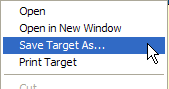
Once you select “Save Target As” or “Save Link As” a download screen will come up asking you where you want to save the file to on your computer.
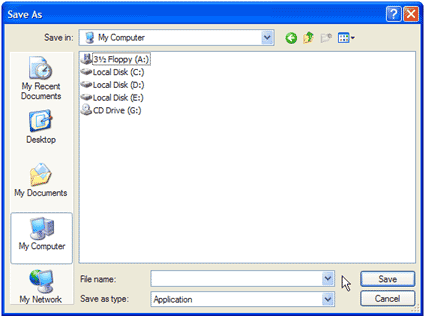
After you’ve finished downloading the file, double-click it to start watching.
Wishing you love and light

[content_box_grey width=”95%”]Important Note: While the method being presented has produced remarkable clinical results, has no known side-effects and has been known to relieve a multitude of physical and emotional ailments, it is still officially classed as being in the experimental stage and so practitioners and the public must take complete responsibility for their use of it. Please consult your doctor before deciding to stop any medication.[/content_box_grey]